Make her an outfit#
The pack studio draws a complete picture pack of the character you have on, in an outfit you describe: seven expressions, each with a blink and three mouth openings, a wave and a cheer, all cut out of their background. You choose the image maker, nothing is drawn before a card tells you what it will use, and you look at the whole pack before it is written to your pictures.
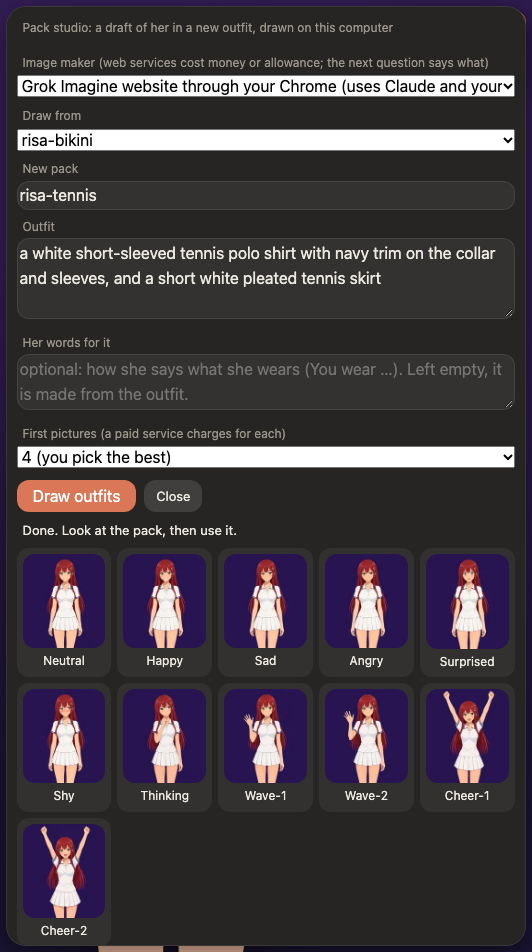
It is a draft maker: the pictures are as good as the image model, and the checks catch the common faults (a broken pose, a repainted background, a mouth that did not change), not all of them. Look at the result in a chat before you rely on it.
Start it#
Type /studio on (or choose Make a pack… in the Looks menu). It is off at every start, it checks that the image maker answers (and that its key, or Claude Code, is there) and says what is missing, but opens anyway so you can choose another maker in its Image maker list, and it is refused from a phone. Then fill in the form:
| Field | What it is |
|---|---|
| Image maker | Where the pictures are drawn (below). |
| Draw from | The pack to start from. Its look, framing and face are kept: the new outfit is an edit of its neutral picture. The form starts from the pack she is wearing. |
| New pack | The folder name of the result, in data/frames/. An existing folder is never replaced. |
| Outfit | The outfit in your own words: colours and materials ("a dark green hooded winter coat over a white knitted sweater and a grey wool skirt"). Leave out her face, hair and the background: they stay as they are. |
| Her words for it | How she says what she wears (You wear …). Left empty, it is made from the outfit. |
| First pictures | How many versions of the new neutral picture to draw (1 to 4) so that you can pick the best one. Fewer costs less. |
In chat you can also just ask her ("could you have a tennis outfit made?"). She fills in the form with her words, and you change anything and press the button: she starts nothing herself. With the studio off, her proposal makes the page ask whether to turn it on.
What happens#
- A card says which image maker it will use, what that costs you, where the pack will be written, and that you are responsible for what is drawn. Nothing is drawn before you press its button.
- The first pictures. The neutral picture of the source pack, on a flat key colour that nothing of her has, is changed to the new outfit. You pick the one you like.
- The rest of the pack (about 38 more pictures): the other six expressions, blinks, mouths, waves, cheers and a hand-on-chin picture. Each is checked and tried up to three times. The eleven main pictures line up in the panel as they are drawn, so a bad outfit shows within minutes and you can stop. Hover over any of them to see it at full size.
- The review. A marked picture failed a check (the mark says which); Draw again redraws it, with its blink and mouths.
- Use this pack writes the pack to
data/frames/<name>, and Show her as … puts it on.
When the four pictures are ready, the pack is ready to review or the job stops while this tab is in the background, the tab's title gets a mark and the words ("● Pack ready to review · Risa") until you look at it again. Nothing is played and nothing is asked.
A job stays on disk (data/studio/<job>/), so it can be carried on after a restart or a failure (Try again from here, or Carry on … in the panel). Delete removes an old one.
The image makers#
| Image maker | Where it runs | What it costs |
|---|---|---|
| A model on this computer | A server you start on your machine; the app talks to it on 127.0.0.1 only. The reference one (python/pack_studio/server.py, FLUX.2 klein 4B) needs about 22 GB of memory: how to set it up. The list always shows this entry; with no model running the studio shows the steps instead. | Time. |
| xAI, Google Gemini, OpenAI (APIs) | Their servers, with your key from the environment (XAI_API_KEY, GEMINI_API_KEY, OPENAI_API_KEY). The key is never saved, shown or sent anywhere else. | Paid per picture, and the card says so. The price is counted from the answers, and a limit per pack (default $5, /studio budget) stops it. In tests one picture cost between 5 and 7 cents. |
| Grok Imagine, Google Gemini, ChatGPT (websites) | The site, in your own Chrome, signed in as you, driven by Claude Code through the Claude in Chrome extension. | No per-picture bill, but it uses your Claude allowance and the site's: it is slow (a minute or two a picture, an hour or more for a pack) and a free account runs out (a free ChatGPT account made about five pictures in a day). Stay at the computer while it runs. |
None of these suit you? /studio handover (it works with the studio off) or the panel's Hand over to an AI agent… gives you a prompt to copy into any AI agent that makes pictures, a chat website or anything else you use. It describes what a pack needs and links to a guide for agents. You attach the neutral picture, take the files it makes, and put the folder in data/frames/.
Choose one in the panel's Image maker list, or type /studio backend xai (gemini, openai, grok-web, gemini-web, chatgpt-web, or the address of a local server).
Using a website#
This is the least obvious one, so read its card. For every picture the app starts claude -p --chrome, which opens the site in your Chrome, uploads the picture and your words, and presses Download; the app takes the downloaded file. That Claude process has no tool but the browser's (and a read of its own job folder), and you approve once for the whole pack instead of for every click. If the site asks for a login, a captcha, a payment or says a limit is reached, the job stops and shows what it said; deal with it in Chrome and press Try again from here. Automating a website may be against its terms and could put your account at risk: that is your responsibility, which is also why you stay at the computer while it runs. It needs Claude Code installed and signed in, whatever brain you chat with, and the extension signed in to the same account.
Good to know#
- A picture cut off at the thigh stays cut off. Most packs are cropped at the thigh. Ask for an outfit that fits (no shoes), and the studio tells the model to keep the picture's framing.
- Colours that look like the key. The key colour is magenta, green or cyan, whichever her pictures contain least of. A pink dress is better on green.
- Outfits are drafts. A pack made like this belongs to whoever made it, carries a
NOTICE.mdthat says it was made with AI and which model, and is not part of any shared pack. Publishing one is a separate, deliberate step. - Not in the app yet: a new character from a description, and activities. The tennis loop of Risa (tennis) was made by hand from a video, then added to the pack.
- The studio applies no content filter of its own and tunes nothing toward explicit pictures; what the image maker draws, and the maker's own terms, are yours to answer for.
The design, the measurements behind it and what is still planned are in docs/pack-studio.md.
Made with AI coding agents, mostly Claude Code. This documentation was written by Claude Code. Details