Work mode#
Flip the Work switch, pick a project folder, and she can read and edit files and run commands there, like a regular Claude Code session. She asks first.
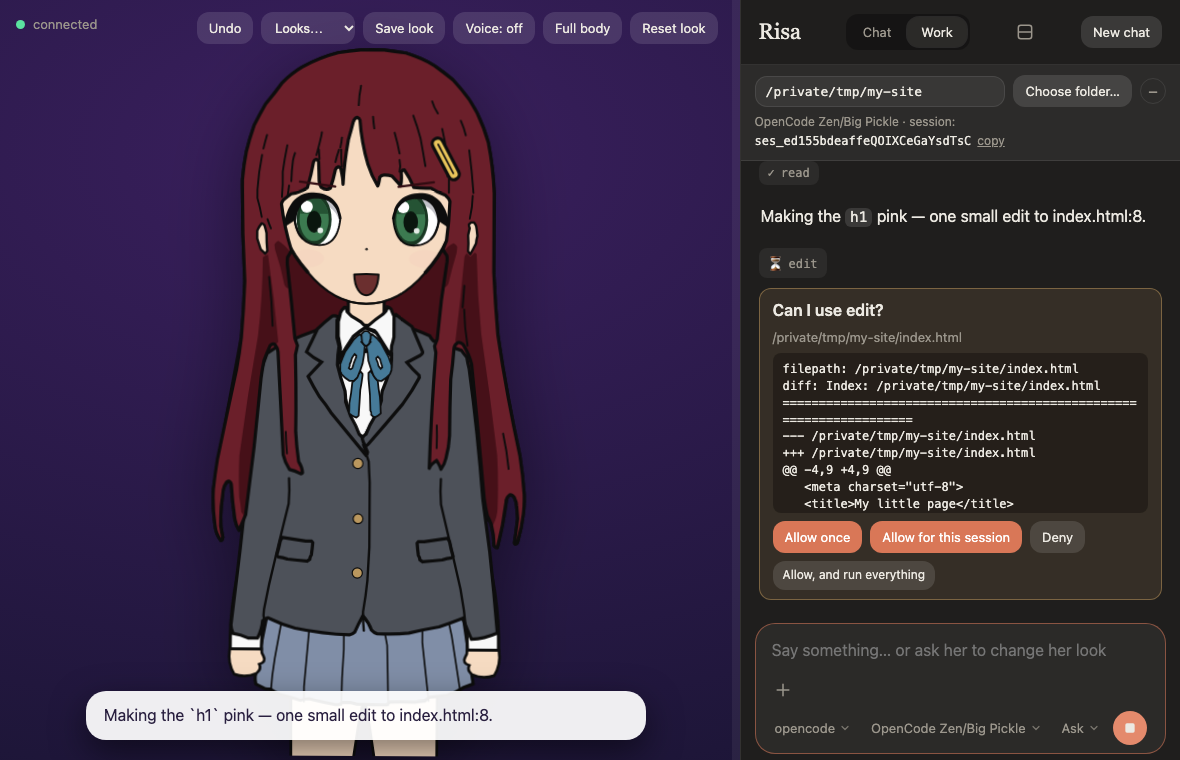
Approvals#
Every action that is not pre-approved shows an approval card with the exact command or file change. Choose
Allow once, Allow for this session, or Deny; a denial is not retried. With a local (Ollama) model, for this session covers later file writes and edits in the project folder, but a shell command only as written. Read, Grep and Glob are
pre-approved (change that in data/settings.json).
The Permissions menu changes how approvals work. It resets to Ask every time the server starts (when Cursor's own CLI is set to run without asking, this app starts in Run everything instead and says so), and can be changed at any time, even while a card is waiting. A phone can choose Run everything; Auto and Accept edits stay on the computer.
| Mode | What it does | Brains |
|---|---|---|
| Ask | every action that is not pre-approved shows a card (the default) | all with tools |
| Plan | she reads and proposes a plan; nothing changes until you approve it | all with tools |
| Accept edits | file edits no longer ask; commands still do | Claude Code |
| Auto | Claude Code's own classifier approves routine actions and blocks risky ones | Claude Code |
| Everything | every tool runs without a card, and she keeps going until done | Cursor, opencode |
Approval cards also offer Allow, and accept all edits (for file edits) and Allow, and switch to Auto, like the terminal's "yes, and don't ask again".
Choosing the folder#
Work here applies the folder you typed. Once she already works in that folder, the same button reads Choose
folder… and opens your system's folder dialog (macOS, or Linux with zenity or kdialog; elsewhere type the
path). The home folder and / cannot be chosen. On a phone the folder bar starts folded away to save room, and the
− and + buttons fold and unfold it on any screen. A phone sets the folder by typing its path (or /work ~/project);
the folder dialog stays on the computer.
anaico starts in work mode for the folder you ran it from. A server that is already running keeps its mode and
folder.
Your own Claude Code setup#
By default your own Claude Code setup is not loaded: a folder's .claude/settings*.json hooks and allow rules,
your user settings and your MCP servers do not apply, so opening an unfamiliar folder runs nothing of its own. The
Use my Claude Code setup checkbox, or /setup on, loads them as in a terminal. Hooks run commands, so it is off
at every start.
Skills#
Skills are not loaded by default either, so she cannot call one by name and would have to read its file by hand. The
Use my skills checkbox, or /skills on, lets her use your own skills (~/.claude/skills) by name. It loads your
user settings, including any permission rules in them, but keeps hooks off. A folder's own skills stay off: those only
load with the whole setup above. It is off at every start.
When she reaches for one of your skills while they are off, she asks before anything is turned on. A folder that has its own skills says so once.
Chrome#
The Use my Chrome checkbox, or /chrome on, lets her drive your own Chrome through the
Claude in Chrome extension. It passes Claude Code's own --chrome and nothing
else, so your other MCP servers stay unloaded unless the whole setup above is on. The extension has to be installed
already and signed into the same Claude account. An API-key login keeps Chrome off even with the flag. Browser
actions use the same approvals as her other tools. It is off at every start, and a phone cannot turn it on.
Helpers running in the background#
Claude Code can start helpers (subagents) that keep working after her reply ends. While any are running, a line above the message box says Waiting for N background agents to finish… (hover it to see what each is doing), so a quiet chat is not mistaken for a finished one. When a helper finishes and she answers on her own, that reply appears in the chat like any other.
Local models#
Work mode also works with an Ollama model that reports tool support. It is experimental and the quality is your responsibility: read the warning on the brains page.
Shell commands#
A message starting with ! runs in the project folder at once, without a card, because you typed it yourself. See
Chatting with her.
From the terminal#
The bar under the header shows claude --resume <session id> with a copy button, so you can carry on the same
conversation in a terminal. Only one side should write at a time.
Made with AI coding agents, mostly Claude Code. This documentation was written by Claude Code. Details